A common problem with development, staging and production environments for WordPress projects is switching your browser between the environments. Traditionally the way to do this was with hosts file updates that redirect a domain name to the IP address of your development server. WordPress is setup with a specific domain name, so running on a subdomain or a development domain name can introduce problems into the site when you move from development to staging or production. In a perfect world your development and staging environments should be 100% identical to the production environment, that way there aren’t additional testing requirements to verify bugs haven’t been introduced in the migration process. Finally there is a convenient way around this by using a proxy.
The development environment in this situation is using the Roots Sage framework which comes gulp and browserwatch which runs on port 3000 by default, but it would be easy enough to setup a similar environment by running apache or nginx on a non-standard port in your development environment.
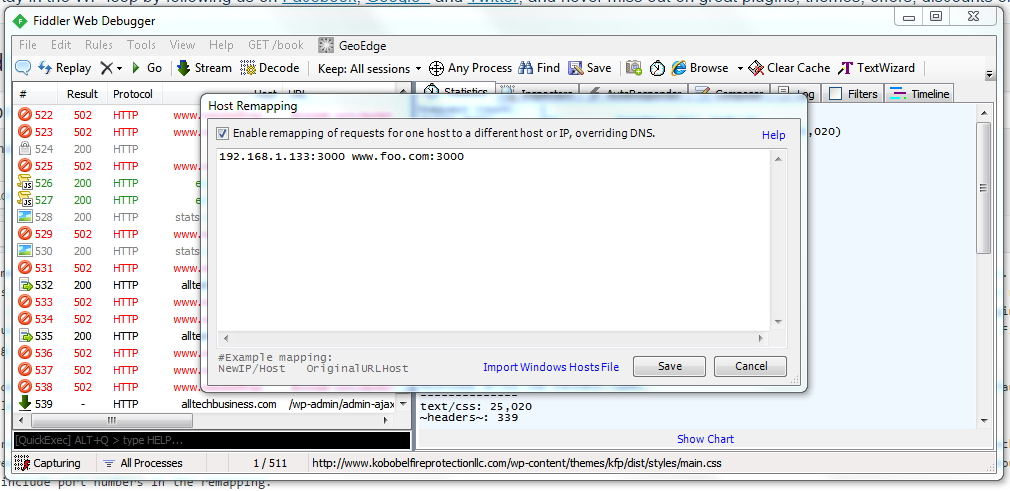
Fiddler is a free “web debugging proxy for any browser, system or platform”. It will run in the background and intercept all of the traffic between your browser and the Internet. One of the options it offers is a Host Remapping function (found under Tools>HOSTS). The great thing about the Host Remapping, for our purposes, is you can include port numbers in the remapping.
In this example, the development environment is running on an Ubuntu server on the local network. www.foo.com:3000 is redirected to the local IP address port 3000. When this is enabled, www.foo.com will route to the live production environment and www.foo.com:3000 will route to the dev environment. This allows you access to both environments simultaneously for comparison. WordPress works exactly the same in both environments.
A big advantage of this is you no longer have to edit your Windows Hosts file every time you want to switch back and forth.
To avoid confusion it might be good to integrate something like WP Local Toolbox which can give you some visual cues as to which server you are accessing without adding additional configuration problems.